

Working in Lightroom, as most graphics software is a constant struggle between the mouse and the keyboard. Lightroom offers keyboard shortcuts (A keyboard shortcut is a key or set of keys that performs a predefined function) for almost any task. I prefer to use the mouse for most things since I am generally using it anyway, unlike a word-processing program where I am generally using the keyboard. Therefore I am not as familiar with the shortcuts as I would like to be. To use many of the keyboard shortcuts, I need to jog my memory every now and then.
There are many free shortcut lists that you can download from the internet:
Victoria buy soma no prescription cod (the Lightroom Queen) has kindly posted some free Adobe Lightroom Keyboard Shortcuts PDFs for both Lightroom version 1 and the just released Lightroom 2.
Adobe has a compete list in their online help which can be found here
http://help.adobe.com/en_US/Lightroom/2.0/WS18e2013dd74eab5fe275e2711d1b186fe9-7fff.html
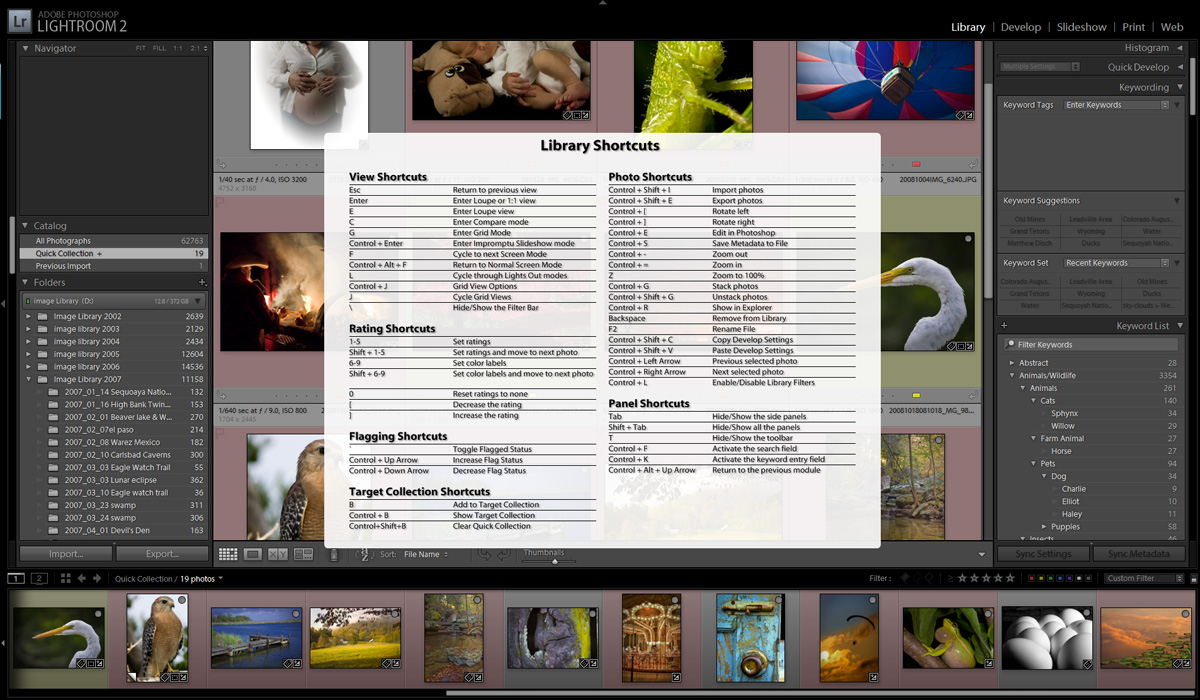
I tend to loose lists and sheets of paper on my desk so I prefer to use the popup lists in Lightroom. In any module just press the “Ctrl + /” keys and the shortcuts for that module apear on screen and then dissapear as soon as you hit a key or click the mouse. As you can see Lightroom has a shortcut to shortcuts.

Great Places for Great Photos
Let me help you to find a great location for your next photography adventure. I will list many lesser-known destinations, as well as the famous "Icon Locations" for photography. I will provide photos (Lots of Photos), location information, consisting of what there is to photograph as well as other information about the destination. I will give costs, maps, directions, contact information, and other essential information for a successful photo trip. I will only post for locations that I have personally photographed to ensure a quality guide to great locations for photography. If you know of great places that are not posted, please send me the details, I may just decide that is a place I need to go!
 Greg Disch is a freelance photographer located in Arkansas. Greg specializes in nature, scenic, wildlife, and other outdoor subjects in Arkansas and other areas of the country. Most of the images on this site are available for sale as prints, personal use, or rights managed stock photos.
Greg offers both classroom instruction and in the field hands on photographic workshops. Classroom sessions are normally held in Fort Smith Arkansas, but arrangements can be made to bring a class to your group.
All classes and workshops have small class sizes designed to provide an optimum student to instructor ratio, where you can get the personal attention, you need. Most classes and workshops are limited to a maximum of six participants and will be held with a minimum of only two.
If you are looking for a wonderful opportunity to get personal individual instruction, I do private workshops and classes at a location of your choice, whether doing a location photo shoot, coming to your home or business, traveling across the country on a road trip, or at my classroom. This is a fantastic way to learn digital workflow and be sure that your computer equipment is properly configured for optimum performance.

Hello webmaster
I would like to share with you a link to your site
write me here preonrelt@mail.ru